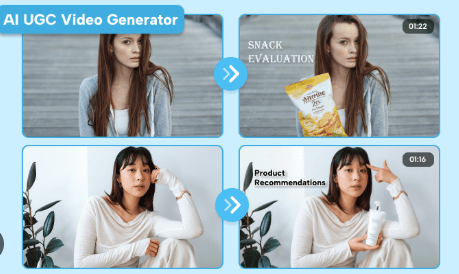
User‑generated content (UGC) is the backbone of modern social‑media advertising: it feels real, builds trust, and drives higher engagement and conversions than polished brand ads. The problem? Hiring real creators is expensive, slow, and hard to scale. That’s where AI UGC video ads come in: you can create scroll‑stopping, “real‑person”‑style videos in minutes, without actors, studios, or a creator‑management headache.
Below is a practical, SEO‑friendly guide on how to create AI UGC video ads without hiring creators, using modern AI‑ad tools and best practices.
What AI UGC Video Ads Actually Are
AI UGC video ads are creator‑style videos generated by AI that mimic real‑user content—think talking‑head testimonials, unboxings, or “I tried this product” reviews—but produced entirely inside a tool. Instead of filming a creator, you:
- Feed in a product link or images.
- Let AI write a script and pick an avatar.
- Generate a finished video you can upload directly to TikTok, Instagram, Facebook, or YouTube Shorts.
This approach can cut production costs by up to 96% while boosting click‑through rates by 130% or more, according to early‑adopter brands.
Why Brands Are Moving From Real Creators to AI UGC
Before diving into the “how,” it helps to understand why more marketers are ditching traditional creator workflows for AI‑driven UGC.
- Authenticity at scale: You can push out dozens of real‑looking, emotion‑driven videos without chasing creators or managing shoot schedules.
- Cost and time savings: No studio, no travel, no creator fees; many AI‑UGC tools let you spin a video in under 10 minutes.
- Consistent brand voice: Same avatar, tone, and style across Instagram, TikTok, and LinkedIn, which most teams struggle to maintain manually.
- Higher engagement and conversions: UGC‑style content typically gets 28% more engagement and can drive 29% higher web conversions than traditional ads.
- Rapid experimentation: Want to test different hooks, angles, or CTAs? Generate 5–10 variants in one sitting and A/B test them live.
If you’re running e‑commerce, DTC, or performance‑driven social campaigns, AI UGC is no longer a “nice‑to‑have”—it’s a must‑have for scaling creatives profitably.
Step‑By‑Step: How to Create AI UGC Video Ads Without Hiring Creators
Here’s a repeatable workflow you can use with most AI‑UGC ad platforms (including Tagshop AI, HeyGen, Bandy AI, and similar tools).
1. Pick the right AI UGC tool
Start by choosing a platform that specializes in scroll‑stopping UGC‑style videos for TikTok, Instagram, and Meta. Look for:
- Product‑link ingestion (paste a Shopify, Amazon, or WooCommerce URL).
- AI script generation tailored to social‑media hooks.
- Multiple AI avatars with different ethnicities, accents, and emotions.
Popular options for creating AI UGC video ads include Tagshop AI, HeyGen, Bandy AI, and InVideo AI, all of which support UGC‑style ad generation without actors.
2. Feed your product into the generator
Most AI‑UGC tools let you paste a product link and auto‑pull:
For example, in Tagshop AI, you simply:
- Copy your product URL (Shopify, Amazon, Etsy, etc.).
- Paste it into the video‑ads generator.
- Let the tool scrape product details and generate short, social‑ready scripts.
This step alone saves hours of manual copywriting and product‑sheet reading.
3. Define your video specs
Next, configure the video to match your platform and audience:
- Aspect ratio: 9:16 for TikTok/Reels/Shorts; 1:1 or 4:5 for feed.
- Duration: 15–30 seconds for performance ads; up to 60 seconds for storytelling.
- Tone and vibe: Casual, “real‑person” language, not corporate.
Many tools let you select “UGC style” or “creator‑style” presets so the output feels native to TikTok and Instagram.
4. Let AI write the script (then tweak)
AI‑UGC generators typically produce 3–5 short scripts based on your product. Your job is to:
- Pick the hook that feels most human (problem‑first or result‑first).
- Shorten sentences for mobile viewing.
- Add a clear single CTA (“Tap the link,” “Use code X,” “Swipe up”).
Example hook structure for an AI‑UGC script:
“I’ve been using [product] for [time] and honestly, it’s changed how I [solve problem]. Before, I [pain point]. Now, I [result] in [time].”
Keep it conversational, not salesy, and avoid jargon.
5. Choose your AI avatar and style
Modern platforms offer hundreds of AI avatars with different looks, ages, and emotions. When selecting:
- Match the avatar to your target audience (e.g., young mom, fitness‑oriented, tech‑savvy).
- Use positive or excited emotions for performance ads; neutral or serious for B2B.
- Test multiple avatars over time to see which drives better CTR and ROAS.
Some tools even let you create a custom character and reuse it across campaigns for brand consistency.
6. Generate, preview, and export
Once you’ve set the script, avatar, and format:
- Hit “Generate” and let the AI render the video with synced lip‑movement and background.
- Preview the output and tweak if needed (change voice, pacing, or background music).
- Download in MP4 and upload directly to TikTok Ads Manager, Meta Ads, or Google Ads.
Many tools also allow batch‑generation, so you can spin 5–10 variations of the same product in one go for testing.
Best Practices for High‑Converting AI UGC Ads
Generating a video is easy; making it convert is the real challenge. Here are proven best practices.
1. Keep it human, not robotic
Even though the video is AI‑generated, your goal is to feel like a real person, not a sales bot. Do this by:
- Using natural language and contractions (“I’ve,” “you’ll,” “don’t”).
- Adding small imperfections in the script (ums, pauses, relatable frustrations).
- Mixing AI‑UGC with real‑user clips (customer‑submitted videos, screenshots, DMs) in your feed.
This combo builds trust and keeps your content from looking “too perfect.”
2. Focus on story, not specs
People don’t buy features; they buy how the product fits their life. Structure your AI‑UGC script around:
- A clear problem the viewer recognizes.
- A transformation (before vs. after).
- A simple, believable result (“saves me 30 minutes a day,” “helps me sleep better”).
For example, instead of “This pillow has memory foam and cooling gel,” try:
“I used to wake up with neck pain every morning. After switching to this pillow, I’ve slept through the night for the first time in months.”
3. Optimize per platform
TikTok, Instagram Reels, and YouTube Shorts all favor UGC‑style content, but each has its own rhythm.
Always resize and re‑crop your AI‑UGC video for each platform instead of cross‑posting the same file.
4. Use AI UGC for rapid testing
One of the biggest advantages of AI‑UGC is the speed of experimentation. You can:
- Test different hooks (problem‑first vs. result‑first).
- Try multiple avatars (different ages, genders, ethnicities).
- Swap CTAs (“Shop now” vs. “Use code X” vs. “Limited‑time offer”).
Run 3–5 variants per product and let the data tell you which performs best, then scale the winners.
5. Be transparent when needed
Some platforms and audiences appreciate disclosure that content is AI‑generated. When in doubt:
- Add a small on‑screen text like “AI‑generated UGC” or “AI‑powered ad.”
- Keep the disclosure subtle so it doesn’t hurt performance but still builds trust.
Honesty often increases perceived authenticity, especially among younger audiences.
Why AI UGC Outperforms Traditional Ads
If you’re still on the fence about replacing creator‑driven UGC with AI‑generated versions, consider the data:
- Around 79% of consumers say UGC influences their purchase decisions.
- About 92% trust UGC more than polished brand ads.
- UGC‑style ads can drive up to 4× higher CTR and ~50% lower CPC than standard creatives.
- Brands using AI‑UGC report up to 130% higher CTR and 96% lower production costs versus traditional shoots.
- In other words, AI UGC gives you the trust and engagement of real‑user content with the speed and cost‑efficiency of automation.
How Often to Post AI UGC Ads
Consistency matters more than perfection. For most brands, a good rhythm is:
- 2–3 AI‑UGC videos per week per product or campaign.
- Rotate different angles (problem‑solving, testimonials, unboxing, “day in the life”).
This keeps your feed fresh, your testing pipeline full, and your ads optimized for the latest trends and platform algorithms.
Final Takeaway
Creating AI UGC video ads without hiring creators is no longer a futuristic concept—it’s a practical, scalable strategy for any brand running performance‑driven social campaigns. By using tools like Tagshop AI, HeyGen, or Bandy AI, you can:
- Turn a product link into a finished UGC‑style ad in minutes.
- Maintain consistent branding and tone across platforms.
- Test dozens of variants without blowing your creative budget.
If you’re a DTC brand, e‑commerce store, or performance marketer, AI UGC is the fastest way to scale high‑converting video creatives in 2026, no camera crew, no creator contracts, just clicks.
 AI Ads
Leave a comment